
Connect to our exclusive server and receive professional high-probability signals instantly and trade with an advantage in real time.
 Direct Connection
 Highly Accurate Signal
 Secure Technology
 Service 24/7

Copy the files:
You will receive three files that must be copied into a folder named EAForex to make them easy to locate and manage.
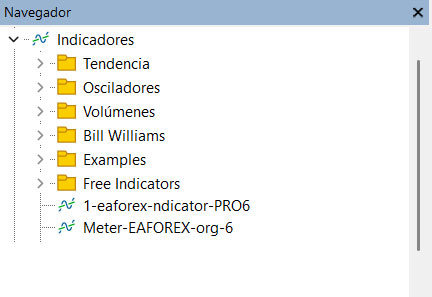
1-eaforex-ndicator-apro6 (Indicator)
Meter-EAFOREX-org-6 (Indicator)
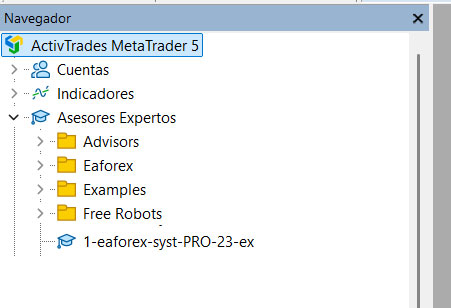
1-eaforex-sys-PRO-23-ex (EA)
In MT5, allow the program to connect to a server for continuous updates.
Then drag the EAforex program onto the charts as explained.
Server connection:
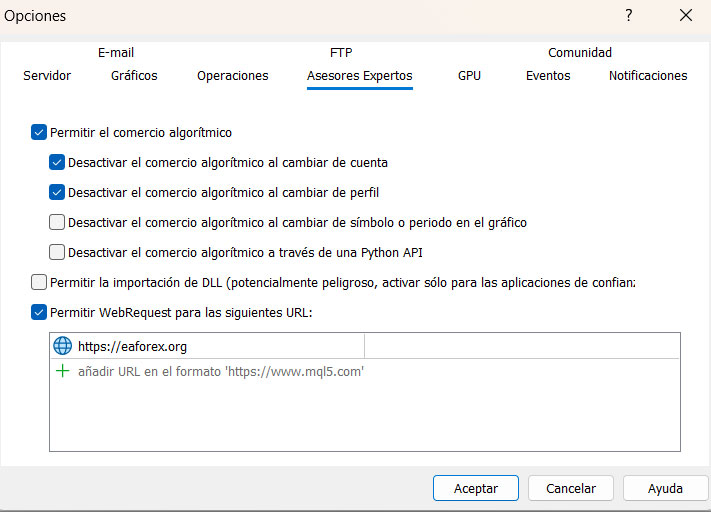
1. Create the connection to the EAforex.org server. Open MT5.
2. In Tools → Options, go to Expert Advisors.
3. Check "Allow WebRequest for the following URL".
4. Double click + and add: https://www.eaforex.org
5. Click OK.
NEXT STEP:
Copy the three received files into the indicated folder:
1. Open File Explorer and navigate to the folder EAForex.
2. Open MT5, go to File → Open Data Folder.
3. Open MQL5 → Indicators.
4. Copy the files: eaforex-indicator-apro6 and Meter-EAFOREX-org-6.
5. Go back to MQL5 → Experts.
6. Copy the file: 1-eaforex-sys-PRO-23-ex.
7. Close everything and restart MT5.
8. Open MT5 → View → Navigator.
9. Drag the Meter-EAFOREX-org-6 indicator to a chart (USD/JPY, EUR/USD, AUD/USD).
Step 3:
Go to View → Navigator → Expert Advisors.
Drag the file 1-eaforex-sys-PRO-23-ex onto each chart.
IMPORTANT:
Once attached, it will read all timeframes.
If your subscription is active, the system will start working.
License authorization may take a few moments as it connects to the server.
Once connected, the algorithm lines will appear on the chart.
If you decide not to renew, the lines will disappear leaving two red lines (no connection) on the chart.